Plan the trip from everything you've saved
Paste a TikTok, a Reddit thread, or a city name. Arriv pins each place with hours and addresses, lays out the days, and gives your group one link to edit.
Free to start. No signup required.
Try one
Reads places from
- TikTok
- Google Maps
- Articles
- Booking emails
- Screenshots
How it works
From a pile of saves to a plan for each day
Every trip starts as links, screenshots, and half-remembered names. Arriv sorts them into one plan your group shares.
- 1
 reddit.com/r/Austin3 places
Collect
Paste a link, drop a screenshot, or forward a booking. Each place lands on the map with hours and an address.
- 2
Saturday · Copilot
- 1Terry Black's11:30
- 2Barton Springs2:00
- 3Continental Club9:00
Plan
Ask Copilot for a day. It proposes stops in order with travel times, and you apply the ones you want.
- 3
Saturday dinner?
MJPUchi3 votesSuerte1 votesJake:Uchi, if it's walking from the loft
Decide together
Send one link. Friends add places, vote on dinner, and talk it through inside the trip.
- 4UA 1182On timeJFKAUS3:00Check in · Door code 4829
Go
Today's plan opens on your phone with the flight, the door code, and the walk to lunch.
Three things you'll make
- Guide
- A ranked list of places with photos and notes. Anyone with the link can open it.
- Trip
- A guide with dates, days, bookings, and the people going.
- Pick
- A quick vote. Friends swipe yes or no on a few spots, and two yeses make a match.
Austin · May 17–19
Fri
Sat
Sun
Step 1 · Collect
Paste a link or drop a screenshot
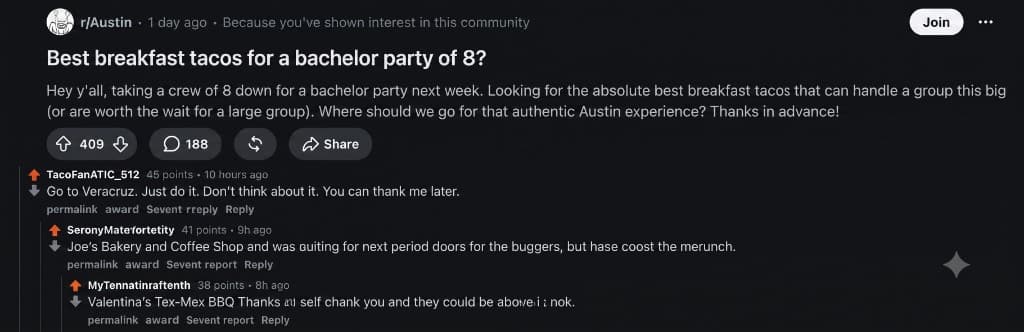
A Reddit thread on breakfast tacos, a reservation email, a screenshot from months ago. Arriv finds the places and pins them with hours and addresses.
Save from the iPhone share sheet, or from any browser tab with the extension. Add to Chrome

Ready
Step 2 · Plan
Ask Copilot for a day and push back until it fits
Describe the trip and Copilot proposes stops on the map. Swap a place or ask for one more, then tap Apply to add the plan to the day.
What you get
Each day becomes one timeline
Arrival day shows the flight landing, the Airbnb check-in, and dinner with its confirmation code, with travel times between stops. When the group votes, the winning bar joins the day.
Friday · Arrival day
May 17 · Austin

UA 1182 lands · AUS
On timeConf XK7M2P · Terminal E

Check in · East Side Loft
Door code 4829 · sleeps 8

Whisler's — won the group vote
Poll · 5 of 7Added to the day automatically

Dinner · Uchi
Reservation · Conf #R842 · party of 8

Bookings, poll winners, and places — one timeline per day
Step 3 · Decide together
The group plans in the same place
Friends open the same live trip from one link, on any phone.
Step 4 · Go
The plan comes with you
Confirmations land on the right day, and the iPhone app keeps today's plan in your pocket.
Bookings
Drag in a confirmation and it lands on its day
Drag in the boarding pass, the booking screenshot, or the group-chat rec. Arriv files each one with its dates, confirmation code, and map pin.

East Side Loft
Fri May 17 – Sun May 19 · 2 nights
Door code 4829

…
Waiting for plans
…
Waiting for stays
…
Waiting for map
iPhone app
Open today and walk to the next stop
The app shows the flight status, the check-in code, and the walk between stops. Share a TikTok or a screenshot from any app straight into the trip.

Today · Fri May 17
Austin bachelor weekend
JFK
11:10 am
AUS
Lands 2:05 pm
Check in · East Side Loft
Door code 4829
9 min walk
Barton Springs
Open until 10 pm
14 min drive
Dinner · Uchi
Table for 8 · Conf #R842
Guides
Make a ranked guide for friends who ask where to eat
Photos, addresses, and a note on why each place made the list. A guide made from a TikTok or Reel links back to the video it came from.
Top 10 Austin food spots
Watch on TikTok· @atxfoodie1 / 9
Veracruz All Natural
1704 E Cesar Chavez St, Austin
The migas taco is the one everyone films. Go before 11am or the line wraps around the lot.
Send it
Drop it in the group chat. It previews with the cover and the place count.
What your friend sees
Read-only, and no account needed to open it. If they want it, they save their own copy and edit that.
- Every place pinned on the same map.
- Friends open the link and save their own copy.
- Opens on any phone, with no app or account.
Or start from a guide that's already mapped
The places are pinned and grouped by neighborhood. Follow one as-is, or save a copy and make it yours.
Pricing
Free for most trips
Pro is for bigger groups and people who plan often.
Free
$0
No card needed
- 2 saved trips
- You + 1 editor per trip
- Guides and one share link per trip
- Places from links, articles, and pasted text
- Basic Copilot
Arriv Pro
$9.99 / month
or $39.99 a year · 14-day free trial on monthly, 1-month free trial on yearly
- Unlimited trips
- The whole group edits
- Full daily use of Copilot
- Bookings and screenshots captured into the trip
- Offline trips and guides
- No ads
FAQ
Questions people ask first
What is Arriv?
Arriv is a free AI travel planner built around a shared map. Describe a trip and it produces a day-by-day itinerary of real, geocoded venues you can reorder, replace, and share. It also imports places from links, screenshots, and pasted text, and gives every trip one link a group can edit together. Members of a trip get Chat, with channels and messages that can point at places and bookings.
Is Arriv free?
Yes. Planning a trip, saving it, publishing a guide, and sharing one link are all free, and the free tier covers you and one editor per trip. Arriv Pro is $9.99 a month or $39.99 a year. Monthly includes a 14-day free trial; yearly includes a 1-month free trial. Pro adds unlimited trips, full daily use of Copilot, larger crews, and booking capture.
How is Arriv different from asking ChatGPT to plan a trip?
A chat assistant returns text. Arriv looks each suggested place up in venue data, puts it on a map with an address, and shows the travel time between stops, so a day that reads fine and involves two hours of transit is visible. The result is a trip you can edit, share, and open while you're standing on the street.
What's the difference between a guide, a trip, and a pick?
A guide is a ranked list of places with photos, addresses, and notes that anyone can open from a link. A trip adds dates, a day-by-day plan, bookings, and the people going. A pick is a quick vote: you add a few restaurants or bars, send the link, and friends swipe yes or no until one place gets two yeses.
Can I plan a trip with friends in Arriv?
Yes. Every trip has one link. Anyone can open it without an account and see the plan. People with a free account can add places, vote on restaurants and activities, and comment. Members also get Chat: channels, threads, and messages that can point at a place or a booking.
Does Arriv have a group chat?
Yes. Members open Chat inside the trip. It starts with a General channel, and editors can add more, such as Dinner or Saturday. A message can mention someone and attach a place, a stay, a day, a stop, a booking, a note, or a poll. Reply under that message to keep a thread, or ask AI on it and Copilot's answer stays beside the message until someone applies a suggestion to the day. The public guide link shows the plan and leaves the chat with the members.
Can Arriv save places from Instagram or TikTok?
Yes. Paste the link, and if the platform blocks the read, which is common, drop a screenshot of the caption or the frames with venue names. Arriv reads the text, matches each name to a real venue, and plots them on a map.
Is there a mobile app?
Yes. Arriv is on the App Store for iPhone. Share a link or screenshot from any app into a trip, and open today's plan with flight status, check-in details, and the walk between stops.
Does Arriv book flights or hotels?
No. Arriv covers planning and discovery. Stay links on destination pages and public guides open Booking, Airbnb, or Expedia. Paid plans can capture booking confirmations into a trip so the details sit on the right day, but Arriv does not charge for the room.
So, where to?
Type a city, or paste the TikTok you saved three weeks ago.
Free to start. No signup required.